 Scoreboard
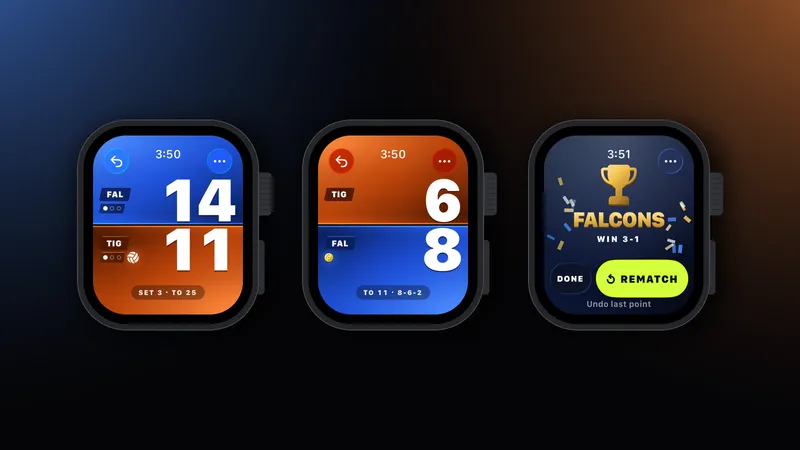
To keep score on your Apple Watch with Scoreboard Live, open the app on the watch, turn the Digital Crown to the sport you want and press START. Tap the top or bottom half of the screen to give that side a point, and hold a half to take one back. The game syncs with your iPhone, so either device can score it. Watch scoring comes with the app's one-time unlock.
The short version
- The watch app comes with the iPhone app. Scoring on the watch needs the one-time unlock.
- Turn the Digital Crown to a sport and press START. It plays that sport's last setup.
- Tap a half for +1. Hold a half for -1, a timeout or the serve.
- Your iPhone and watch score the same game, in both directions.
- Set Return to App so the board is still there when you raise your wrist.
Before you start
The Scoreboard Live watch app installs with the iPhone app, so there's nothing separate to download. Scoring on the watch is part of the unlock, including the simple count up board. Without it, the watch's START reads "UNLOCK ON IPHONE". You buy the unlock on your iPhone, and the watch picks it up; if it hasn't yet, tap CHECK AGAIN on the watch.
Start a game on the watch
Open Scoreboard Live on the watch and turn the Digital Crown. The first page is your live game, with Resume, or your last result, with Rematch. After that there's a START page for each sport: Count up, First to 21, Players, Golf & cards, Volleyball, Beach volleyball, Pickleball, Ping pong, Tennis, Padel, Badminton, Squash, Pool and Cornhole.
START plays that sport's last setup, or its default if you haven't played it yet. Setup itself happens on the iPhone, so if you want a different format (say, pickleball games to 15, or a race to 7 in pool), set it up once on the phone and the watch will use it next time.
Score from your wrist
- Tap a half of the screen to give that side a point. You feel a haptic that points up for the top half and down for the bottom, so you know which side you scored without looking.
- Hold a half for its menu: -1, TIMEOUT and SERVE HERE. In cornhole you get +3 HOLE, END INNING and -1 BAG.
- Undo and Menu sit in the toolbar. The Menu has Swap sides, Serve, Timeout, Sun, Finish now, Reset, Discard, Redo and Home.
- For player games (count up and first to), tap a player's row for +1 and hold it for -1 or a bigger amount. In rounds games like golf, turn the Digital Crown to enter the score.
When a set ends you get a set card, and the match ends on the trophy screen.
iPhone and watch, in sync
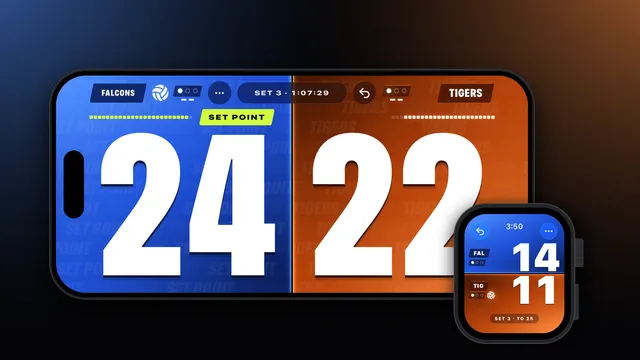
The iPhone and the watch score the same game, and it works both ways. Start a game on the phone and it's on your wrist; score on the watch and the phone catches up. A game started, renamed or ended on one does the same on the other. Each side also keeps its own saved copy, so if one is out of range or offline, it keeps scoring and the two catch up later. Reopen the watch app and the exact score is still there.
A handy setup: prop the iPhone up as the big scoreboard everyone can see, and keep score from your wrist.
Keep the board on screen
With Always On, the watch board dims when you lower your wrist. Between points, though, your watch can go back to the clock face. To stop that, Apple's guide says to go to Settings on the watch, tap General, then Return to Clock, scroll down and tap the app, then turn on Return to App. Scoreboard Live shows this tip once on the board so you don't have to remember it.
Complications and the Smart Stack
- Complications: add Scoreboard Live to your watch face in the circular, rectangular, inline or corner spots. It shows the watch's live game or your last result, and a tap opens the board.
- Smart Stack: when you score on your iPhone, the game's Live Activity also shows in the watch's Smart Stack. Turn the Digital Crown up or swipe up from the watch face to see it. It shows the score and is display only, so you score on the board itself.
Good to know
- Darts is view-only on the watch. It shows who's throwing, the score left and the checkout to aim at. Start and score darts on the iPhone, and see darts 501 rules and checkouts for the game itself.
- No Apple Health. Scoreboard Live doesn't start a workout or log anything to Health. If you want the activity counted, start a workout in Apple's Workout app as well.
- Your games stay on your devices. No account, no sign-in, no ads.
Get Scoreboard Live
Scoreboard Live is free to download, with a one-time unlock (US$3.99 in the US, Family Sharing included, no subscription) that adds every sport, up to 8 players, darts, team names and colours, the full history and scoring from your Apple Watch. See Scoreboard Live on Apple Watch, the Apple Watch scoring guide, read what's in 1.0, or get it on the App Store.
Keep score with Scoreboard Live
Scoreboard Live turns your iPhone into a big, bright scoreboard, with scoring on Apple Watch. Tap a side to score: it knows the rules of your sport, follows the serve and the sets, and puts the big moments on the board.