 Scoreboard

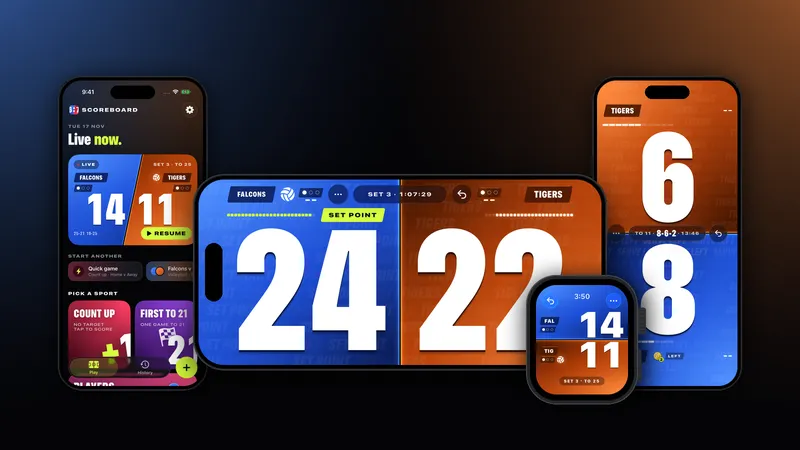
Scoreboard Live is now on the App Store for iPhone and Apple Watch. It turns your phone into a big, clear scoreboard you score with one thumb: tap a side for a point, pull down to take one back. It knows the rules of ten sports, from volleyball and pickleball to tennis, pool and cornhole, and it also keeps score for darts and for games with 2 to 8 players. It's free to download, with a one-time unlock for the full set.
The short version
- Tap a side: +1. Pull down: -1. Undo goes all the way back to the first point.
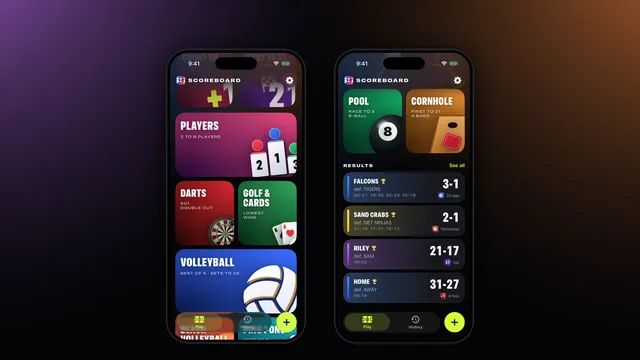
- Ten sports with their real rules: volleyball, beach volleyball, pickleball, tennis, padel, ping pong, badminton, squash, pool and cornhole.
- Darts, player games and golf or card games for 2 to 8 players.
- Apple Watch scoring, synced with your iPhone both ways.
- Widgets and a Live Activity on the Lock Screen and in the Dynamic Island.
- No account, no ads, no subscription. Your games stay on your devices.
The board
The board is the whole point of the app: two huge numbers you can read from across a court or a bar. Tap a side and it gets a point. Pull down on a side and it loses one. Hold a side for half a second and you get a menu with -1, a timeout, who serves, or the team's name and colour.
Made a mistake? Undo is unlimited for the game, and a long press on Undo shows a rewind list of your last 12 actions with the score and the time, so you can jump straight back to any of them.
The board also reads the game for you. Calls show up on screen as you play: SET POINT and MATCH POINT in volleyball, the three-number call and SIDE OUT in pickleball, DEUCE, ADVANTAGE and GOLDEN POINT in tennis and padel, ON THE HILL in pool, FOR THE WIN in cornhole. When the rules say it's time to switch ends, the two sides swap places on their own. The screen stays awake while you score, and it works in portrait or landscape, with Sun mode for bright days and left-handed controls in Settings.
Try the board: tap either side of this volleyball set to 25, starting at 22-21.
Sports in 1.0
Every sport has its own setup page with the options people actually change, and it remembers your last setup for next time:
- Volleyball and beach volleyball: best of 5, 3 or 1, set length, deciding set length and timeouts.
- Pickleball: side out or rally scoring, doubles or singles, games to 11, 15 or 21.
- Tennis and padel: advantage or golden point, sets to 6 or 4 games, and a tiebreak, a tiebreak to 10, a match tiebreak or an advantage set to decide.
- Ping pong, badminton and squash: games to 11, 15 or 21 (by sport), win by 2, serve tracked for you.
- Pool: 8-ball, 9-ball, 10-ball or other, race to any number of racks, alternate, winner or loser break.
- Cornhole: cancellation or every bag, 21 or more or exactly 21, and your own bust score.
- Darts: 301, 501 or 701, double out or straight out, legs and sets, with the checkout to aim at and a three-dart average.
- Players, golf and cards: 2 to 8 players, count up or first to a target, golf, hearts or any rounds game.
For anything else there's the plain two-team scoreboard: count up with no target, or first to any number from 1 to 999, with win by 2 and a cap if you want them.
On your wrist
The Apple Watch app comes with the iPhone app. Pick a sport on its START pages, tap the top or bottom half for a point and hold a half for -1. The watch and iPhone score the same game, and either one catches up if they lose touch. Watch scoring is part of the unlock, and darts on the watch is view-only.
Widgets, Live Activity and history
A live game shows up as a Live Activity on the Lock Screen, in the Dynamic Island and in your Apple Watch Smart Stack. The Score widget shows the game in progress or your last result on the Home Screen or Lock Screen.
Every finished game is saved on your iPhone with its set scores. Two-team games get a matchday poster, a 4:5 image in the winner's colours with the line score, ready to share. Rematch is one tap away.
Free, and what the unlock adds
Free to download, the app gives you the plain two-team board (count up or first to), undo, keep-awake, Sun mode, widgets and the Live Activity, with HOME in blue against AWAY in red.
A one-time unlock (US$3.99 in the US) adds every sport, games for up to 8 players and darts, Apple Watch scoring, team names and colours, and your full history. There's no subscription and no ads in either version, and Family Sharing is included.
Your games stay yours
Scoreboard Live has no account and no sign-in, and it collects no data. Games are saved on your iPhone and Apple Watch, and the two sync directly with each other. Questions? The FAQ and support page have answers.
Keep score with Scoreboard Live
Scoreboard Live turns your iPhone into a big, bright scoreboard, with scoring on Apple Watch. Tap a side to score: it knows the rules of your sport, follows the serve and the sets, and puts the big moments on the board.