 Scoreboard
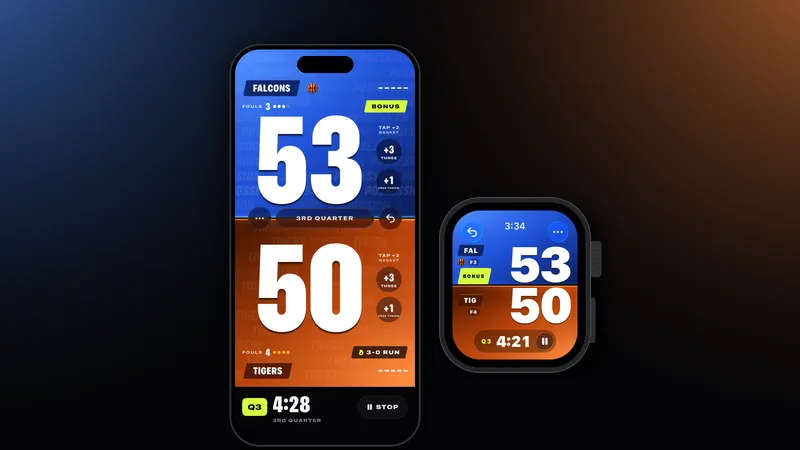
Scoreboard Live 1.1 is on the App Store now. It makes the app smoother, adds a game clock and 15 sports that need one, from basketball and soccer to ice hockey, rugby and hurling, and brings baseball and softball, scored by inning. Every new sport works on Apple Watch too, and the widgets and Live Activity now show the period, the running clock and the inning.
The short version
Bug fixes
- Smooth scrolling: Home and History scroll smoothly again, with no lag after you open the app.
- Faster to start and finish: starting a match and tapping Done to go back to Home no longer pause.
- No more cut-off calls: long calls on the landscape board, like padel's golden point, fit on screen.
Improvements
- 15 clock sports: basketball, soccer, futsal, ice hockey, American football, rugby union, rugby league, handball, water polo, lacrosse, netball, field hockey, Australian rules, Gaelic football and hurling.
- A real game clock: start, stop and adjust it, with periods, breaks, and shootouts or penalties where the sport has them.
- Baseball and softball: runs by inning, an inning bar and a pitch pad.
- Possession: in basketball and American football, the ball changes sides when a team scores.
- Apple Watch: score every new sport from your wrist, clock included.
- Widgets and Live Activity: they show the period, the running clock and the inning.
- Unlock: a new screen shows everything you get, and Settings shows your unlock at the top.
- Rate Scoreboard: you can now do it straight from Settings.
A smoother app
The first thing you'll notice in 1.1 is what you don't notice. Scrolling Home and History is smooth again, so the list keeps up with your thumb right after you open the app. Starting a match is quicker, and so is tapping Done to get back to Home. Long calls on the landscape board, like padel's golden point, are no longer cut off at the edge of the screen.
Game clock sports
Each sport starts with its usual format. Basketball has FIBA, NBA and College rules, soccer has League and Knockout, and rugby union has Fifteens and Sevens. You can change the number of quarters, halves or periods, the minutes in each, whether the clock counts down, counts up or adds time, overtime or extra time, shootouts or penalties, and timeouts a side.
The scoring buttons match the sport. Basketball has a basket, a three and a free throw. American football has a touchdown, field goal, extra point and safety or two-point try. Rugby has tries, conversions and penalty or drop goals, and Australian rules shows goals and behinds. Our guides cover the rules of each, starting with how to score basketball and how to score soccer. Each sport has a page showing its board: basketball, soccer, ice hockey, American football and baseball.
How the clock works
The clock pad has START and STOP, and SET CLOCK nudges it by the minute, ten seconds or second when you fall behind the real clock. At 0:00 the period ends on its own with a haptic, and the board shows the break, like HALF TIME or END OF Q1, with the periods so far. The next period starts when you tap its START button.
Because the clock is saved with every change, undo and a relaunch both keep it exact. Basketball and other sports with fouls also get team fouls and the bonus.
Possession that follows the score
In basketball and American football, the board shows which team has the ball. When a team scores, possession changes sides on its own, so you don't have to tap it.
Baseball and softball
Pick 3, 5, 6, 7 or 9 innings, extra innings while level or a tie that stands, and a run rule of 10 runs after the 4th or 15 after the 3rd. Baseball starts at 9 innings and softball at 7.
The board shows the inning with a top or bottom arrow, the count of balls and strikes, and the outs. The pitch pad has BALL, STRIKE, FOUL, OUT, HIT and ERROR, and runs go into a line score by inning, with hits and errors. The baseball guide walks through a half inning, and softball has its own guide.
On your wrist and on your Lock Screen
On Apple Watch, the new sports get their own START pages, with basketball, soccer, ice hockey, American football and baseball up front and a MORE SPORTS page for the rest. The watch has the clock bar with play and pause, END and SET CLOCK on the Digital Crown, and the inning bar and pitch pad for baseball. For the basics, see the Apple Watch scoring guide and the Apple Watch page.
Widgets, the Live Activity and the watch complications now show the period, the running clock, breaks, shootouts and the inning. Game details show the line score by period or inning.
A clearer unlock
When you unlock Scoreboard Live, a new celebration screen now lists everything you get: every sport, the game clock sports, baseball and softball, up to 8 players and more. Once you've unlocked, Settings shows a status card at the top, so you can see at a glance that it's done. Rate Scoreboard is in Settings too, if you'd like to leave a rating without leaving the app.
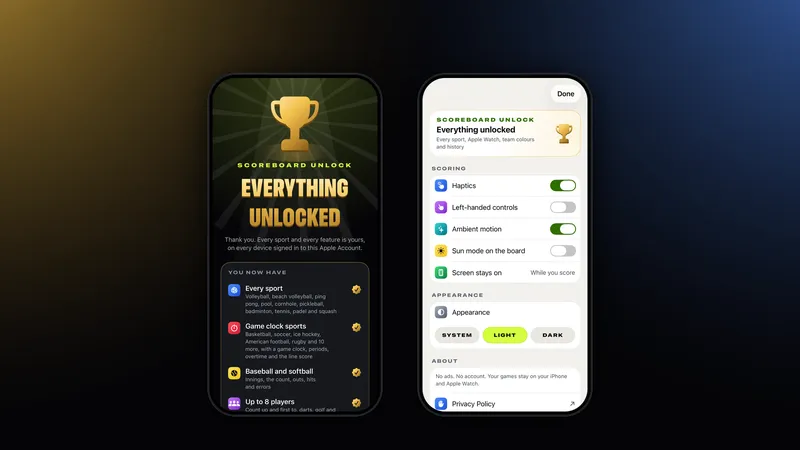
See what's in the unlock for the full list.
Getting 1.1
The new sports are part of the one-time unlock, like every sport in Scoreboard Live. If you've already unlocked, they're yours with the update. There's still no subscription and no ads, and your games still stay on your iPhone and Apple Watch. If you missed the first release, Scoreboard Live is here covers the original ten sports, darts and player games.
Update Scoreboard Live on the App Store, or open its App Store page if you're new to it. It's free to download.
Keep score with Scoreboard Live
Scoreboard Live turns your iPhone into a big, bright scoreboard, with scoring on Apple Watch. Tap a side to score: it knows the rules of your sport, follows the serve and the sets, and puts the big moments on the board.