 Scoreboard

Scoreboard Live 1.2 is on the App Store now. It runs on older iPhones and Apple Watches, it has 44 written guides to scoring built into the app, and it keeps better track of the ball in American football. There's one small fix for rugby sevens too.
The short version
Bug fixes
- Rugby sevens: the game now shows "Sevens" as its rules.
Improvements
- Older devices: Scoreboard now runs on iPhones with iOS 17 or later and Apple Watches with watchOS 10 or later.
- Guides: step-by-step guides for every sport and for the app, in Settings and from the i on each sport's setup, even offline.
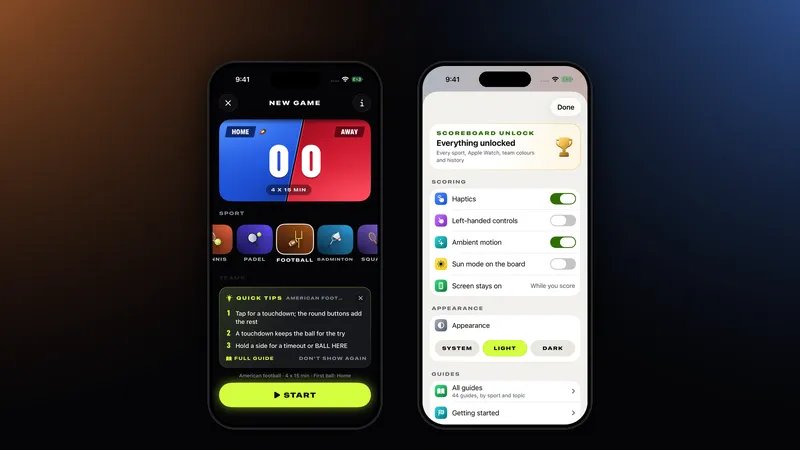
- Quick tips: three short tips before your first game of a sport, easy to skip.
- American football: a touchdown keeps the ball for the try, and the extra point, 2-point try or field goal gives it to the other team. A safety gives it to the team that scored.
- American football: a NO GOOD button for a missed try.
Older iPhones and Apple Watches
Before 1.2, the app needed iOS 26 and watchOS 26. Now it runs on iPhones with iOS 17 or later and on Apple Watches with watchOS 10 or later. If you held off because your phone or watch wasn't new enough, try it again. The look is a little different on older versions, since the newest iOS has its own glass style, but the boards, the scoring and the sports are the same.
Guides inside the app
The website already had a guide for every sport. In 1.2 they're in the app, 44 of them, so you can check a rule at the table without leaving your game. They cover how to score each sport, plus the app itself: getting started, Apple Watch, the Live Activity and Lock Screen, and widgets. They're the same ones you'll find on the guides page.
You can reach them from a few places:
- Settings has a GUIDES card, with All guides and a list grouped by category.
- The i on a sport's setup opens the guide for that sport.
- The board's menu has a Guide item, so it's one tap away mid-game.
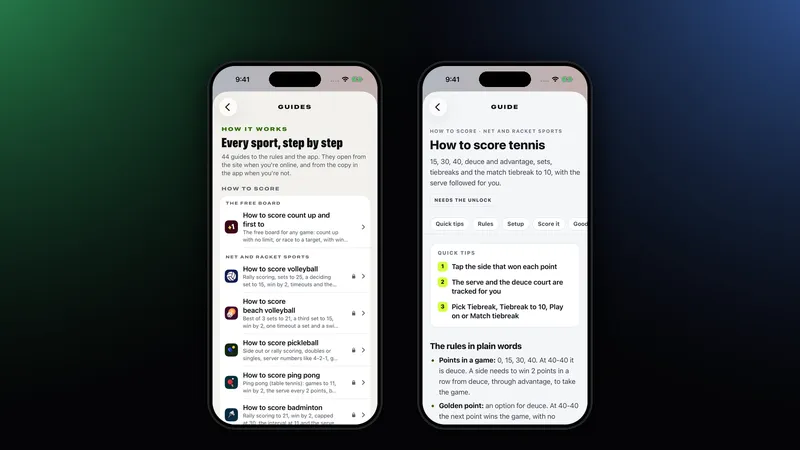
When you're online, a guide opens the live page. If you're offline, or the site is slow to answer, the app shows a saved copy that comes with it, marked with a SAVED COPY chip. So the guides work at a court with no signal. Links to other guides stay in the app, and other links open in Safari.
Quick tips before you start
The first time you set up a sport, three short quick tips show above START. They're written for that sport, so football tells you how the touchdown buttons work and where to hold for a timeout. Tap DON'T SHOW AGAIN, or just tap START: the tips never hold up the game. They show once per sport, and the FULL GUIDE link opens the whole guide.
American football: the ball follows the kickoff
In 1.1 the ball changed sides whenever a team scored. Football isn't quite that simple, so 1.2 follows the real sequence:
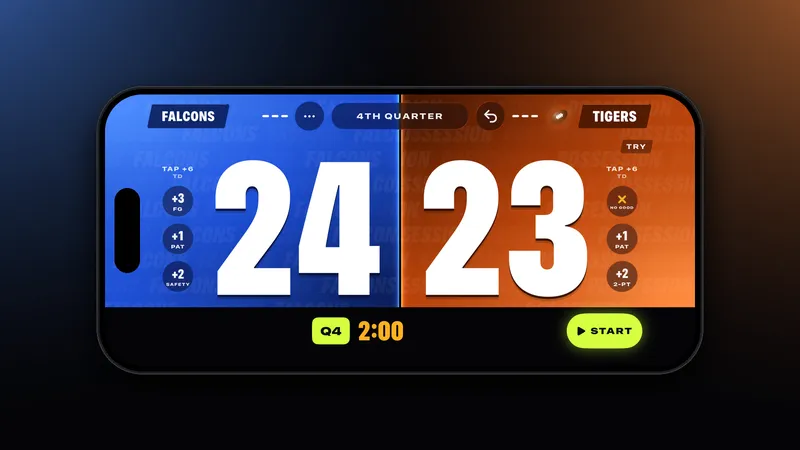
- A touchdown (TD, +6): the team keeps the ball for the try, and the board shows TRY next to it.
- The extra point (PAT, +1), the 2-point try (+2) or a field goal (FG, +3): the ball goes to the other team.
- A safety (+2): the ball goes to the team that scored it, since the team that scored gets the ball.
During your own try, the +2 button reads 2-PT, and a NO GOOD button takes the place of the field goal. Tap it for a missed try and the ball goes to the other team. The same buttons are on the hold menu and on Apple Watch. A try also ends when the clock starts for the kickoff, or when the next score is recorded, and a new quarter leaves the ball where it is. If you undo a touchdown, its try goes with it, and you can still move the ball by hand with BALL HERE.
Basketball is unchanged: every score still hands the ball to the other side. For the rules behind this, read how to score American football, or see the American football page for the board.
Rugby sevens
A small fix: the rules for a rugby sevens game now say "Sevens", where before they didn't.
Getting 1.2
1.2 is a free update. There's still no subscription and no ads, and your games still stay on your iPhone and Apple Watch. If you missed the last release, what's new in 1.1 covers the game clock, baseball and softball.
Update Scoreboard Live on the App Store, or open its App Store page if you're new to it. It's free to download.
Keep score with Scoreboard Live
Scoreboard Live turns your iPhone into a big, bright scoreboard, with scoring on Apple Watch. Tap a side to score: it knows the rules of your sport, follows the serve and the sets, and puts the big moments on the board.