 Scoreboard
The rules in plain words
- Scoring: a touchdown is 6 points, a field goal is 3, an extra point is 1, and a safety or a two-point conversion is 2. A tap on a side scores a touchdown (+6).
- The game: 4 quarters of 15 minutes. The clock counts down.
- Overtime: if the score is level at the end, overtime is 10 minutes. If it is still level after that, the game can end tied.
- Timeouts: 3 per side per half. They come back for the second half and for overtime.
- Possession: a ball marker shows which side has the ball. Every score (a touchdown, the extra point, a two-point conversion, a field goal or a safety) hands it to the other side. You can move it by hand at any time, for a turnover.
Set it up
| Option | Choices |
|---|---|
| Quarters | 1 to 4 (4 by default) |
| Minutes each | 1 to 90 (15 by default, counts down) |
| Overtime | On or Off |
| Timeouts a side | 0 to 9 (3 by default) |
| First ball | Pick a team, or tap TOSS |
Score it in the app
- On Home tap American football (one of the big posters). Check the setup, pick who has the ball first, and tap START.
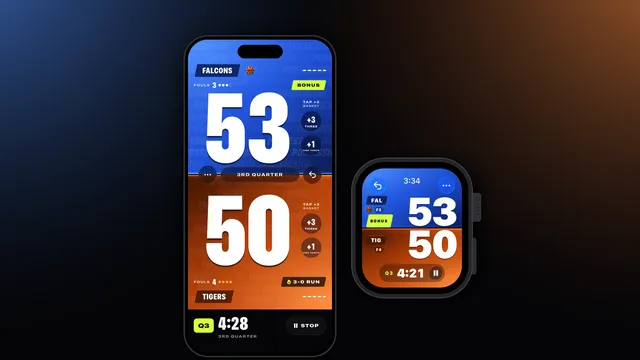
- Tap START on the pad under the scores to run the clock. STOP pauses it. The clock keeps its time if you leave the app.
- Tap a side for a touchdown (+6). The round buttons beside the number read FG (+3), PAT (+1) and SAFETY (+2, also for a two-point conversion). Or hold a side and pick one from its menu.
- The ball marker moves to the other side after every score. If it is wrong, hold the side that should have the ball and tap BALL HERE, or use Menu, then Serve.
- For a timeout, hold the side and tap TIMEOUT. A 30 second countdown shows on the board.
- The clock counts down. At 0:00 the period ends by itself and a break card shows the periods so far.
- On the break card tap the volt button (START Q2 and so on). The next period starts and its clock runs at once.
- If the clock is wrong, tap it to open SET CLOCK. Nudge it by a minute, ten seconds or one second, then tap SET.
- At the end the board shows the winner, or a draw where the sport allows one. The game is saved with its score for every period.
Good to know
- A score you add during a break counts for the period that just ended.
- Tap the score bug to open the line score, with the points in each period.
- Fix a mistake: pull down on a side to take one point off, or tap Undo on the control strip. Press and hold Undo to see your last 12 actions and jump back to any of them.
- The app has no sound. When a clock reaches the end of a period it ends it by itself, with a haptic tap, and the board shows the break.
See how american football looks on the board: American football in Scoreboard Live.
Needs the unlock
This is part of Scoreboard Unlock: one purchase, $3.99 once in the US (your local price elsewhere), that opens every sport, 2 to 8 players, Apple Watch scoring, team names and colours and your full history. No subscription, and Family Sharing is included. See what the unlock includes.