 Scoreboard
The rules in plain words
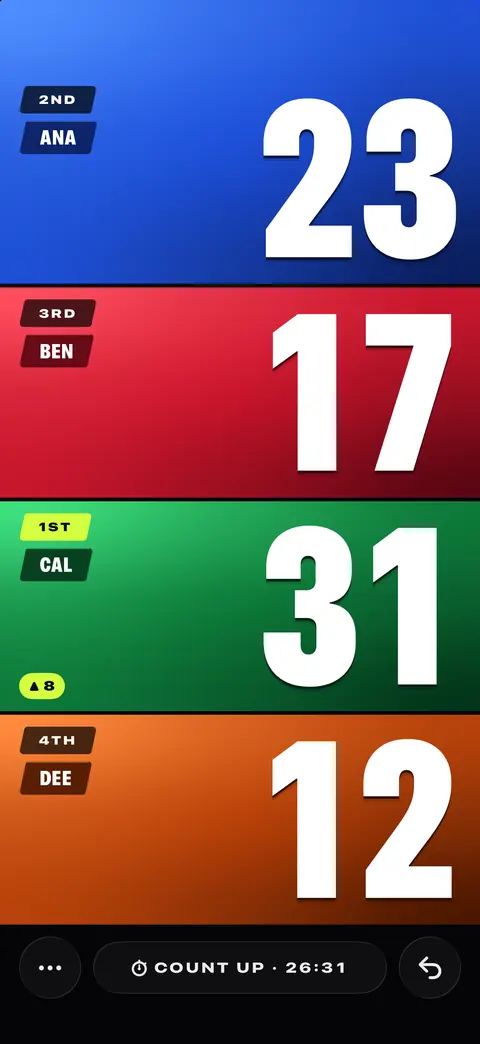
- Players: 2 to 8. Each gets a name, a colour and a tile on the board.
- Count up: everybody starts at 0 and the scores go up, or down, as you enter them. You finish the game yourself. The highest total wins.
- First to: pick a target: 21, 50, 100, 500, or any number up to 99,999. The first player to reach it wins.
- Finish: N or more (reaching or passing the target wins), or Exactly N (you must land on it).
- Going past: with Exactly, choose what happens if a player goes over: Drops back (to a score you pick) or Doesn't count (the extra points are ignored).
Set it up
| Option | Choices |
|---|---|
| Players | 2 to 8, with names and colours |
| Scoring | Count up or First to |
| Target | 21, 50, 100, 500 or any target |
| Finish | N or more, or Exactly N |
| Going past | Drops back or Doesn't count (with Exactly) |
Score it in the app
- On Home tap Players. Set how many players, type the names, pick colours, and tap START. SHUFFLE mixes the order.
- Tap a player to add 1 point.
- Pull down on a player to take 1 point off.
- Hold a player for the points pad. Type any amount, then tap ADD or TAKE OFF.
- Open the standings sheet any time to see who is ahead.
- At the end the board shows a podium with 1st, 2nd and 3rd, and TIED when first place is shared.
Good to know
- Fix a mistake: pull down on a side to take one off, or tap Undo on the control strip. Press and hold Undo to see your last 12 actions and jump back to any of them.
- A name you leave empty is saved as Player 1, Player 2 and so on.
- Player games have no poster to share. You can open them in History to see the standings.
See how the player games looks on the board: Players and party games in Scoreboard Live.
Needs the unlock
This is part of Scoreboard Unlock: one purchase, $3.99 once in the US (your local price elsewhere), that opens every sport, 2 to 8 players, Apple Watch scoring, team names and colours and your full history. No subscription, and Family Sharing is included. See what the unlock includes.