 Scoreboard
See your games
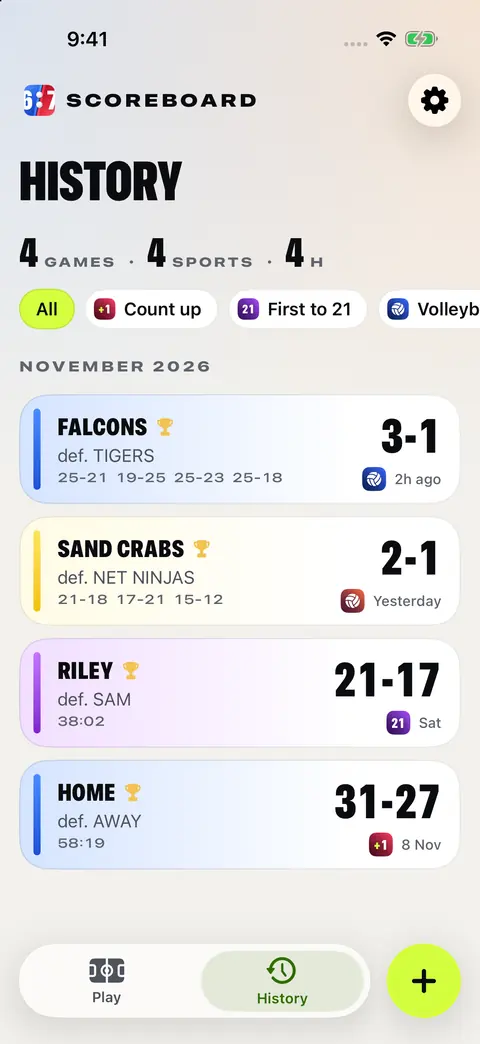
- On Home, tap History on the bar at the bottom.
- At the top, a stats strip sums up your games. Sport chips filter the list. Results are grouped by month.
- Tap a result to open it. You see the winner, the line score (the score of every set, game, period or inning), and the facts: the format, the date and time, how long it was played, and whether it ended early.
- Tap REMATCH to play the same teams and format again, in one tap.
- Tap SHARE to send the result. Choose a Poster, a picture of the result in the winner's colours (4:5, 1080 by 1350), or a Score bug, a transparent picture of the two sides and the score.
- To delete a result, tap Delete this result, or press and hold it in the list and choose Delete.

Free and unlocked
- Every finished game is saved on your iPhone, in the free version too, and nothing is ever deleted.
- With the unlock, History shows every result.
- Without it, Home shows your latest result. The others stay saved and open once you unlock.
Good to know
- Posters are for games between two teams. Games with players show the standings or the podium, with the round table or the legs.
- Your games are kept on your iPhone only. There is no account and no cloud copy.
- The Home hero and the result trophy also have Rematch.